
Pointer Events
The mouse example combines a toolbar, a draggable divider, a release-to-click zone, hover feedback, and a modal. Pressing a Button changes the counter immediately; clicking the separate click zone updates its single/double/triple count after release.
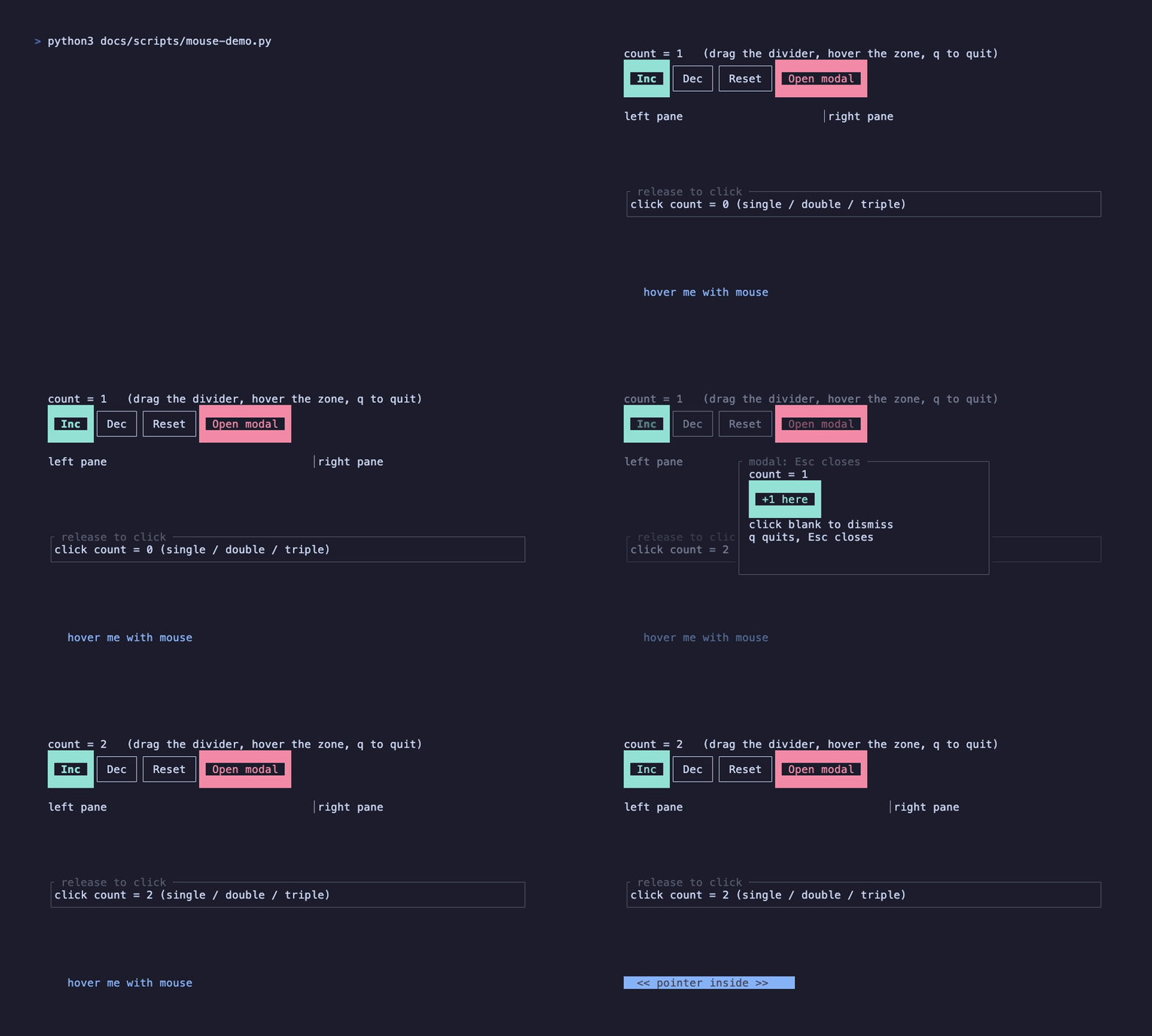
Drag the divider with the left button. Open the modal with the toolbar; click its button to keep it open, or click an unhandled area to dismiss it. Esc closes the modal; q quits even while it is open. The recording uses docs/tapes/mouse.tape and docs/scripts/mouse-demo.py to send real SGR mouse reports into a PTY running the example.
Enable at the entry point
Section titled “Enable at the entry point”Mouse input is core functionality and needs no feature flag. Terminal capture is an explicit runtime choice:
fullscreen() keeps mouse capture off. For an inline viewport, use render_loop_with(terminal_options, RunOptions { mouse: true }). The framework restores mouse modes on exit. Depending on the terminal, holding Shift allows native selection while capture is active.
Registering a pointer hook without enabling capture triggers a diagnostic assertion in debug builds. In release builds, ordinary terminal input will not deliver pointer reports unless capture is enabled.
Choose the smallest API
Section titled “Choose the smallest API”| Need | API | Trigger |
|---|---|---|
| A visible action | Button | Left-button Down |
| Release inside the same component | use_click | Down + Up; any mouse button |
| Visual feedback inside a region | use_hover() -> bool | Movement into/out of the drawn area |
| Resize or drag | use_drag | Left-button Start / Move / End / Cancel |
| Hover a custom list item | use_hover_row | Returns State<Option<T>> from a drawing-coordinate hit mapper |
| Render and drag a custom scrollbar | use_scrollbar | ScrollbarOptions + on_seek(usize) |
| Custom filtering or propagation | use_pointer | PointerEvent, callback returns EventResult |
Call hooks unconditionally and in a stable order. To enable or disable an action, guard its callback or mount/unmount a child component; do not conditionally call the hook in the same component.
Clicks and consecutive clicks
Section titled “Clicks and consecutive clicks”Click contains count, button, position, and modifiers. Count starts at one, increases to two/three for nearby clicks within a 300ms window, and caps at three. Each completed click invokes the callback immediately: a double click produces count one followed by count two. Releasing outside the component does not synthesize a click. use_click consumes the matching press/release events; for custom propagation use use_pointer.
Hover follows the active input layers. A blocking modal excludes background hover trackers. The runtime requests all movement reports only after a hover or track_move registration appears; once enabled, that mode remains on until exit. Movement inside an unchanged hover area can skip redraw. A terminal without movement reporting can still handle presses and dragging.
Drag with capture
Section titled “Drag with capture”DragUpdate::from is the previous event position, not the gesture’s original start; to is the current position. Both use absolute terminal-cell coordinates. Applying the delta avoids confusing a container’s local width with a terminal column.
A consumed Down captures that button. Subsequent Drag/Up events go exclusively to the same handler even outside its area, before global or layered handlers. Up releases capture; unmounting or deactivating the captor’s layer invalidates it. Buttons are captured independently.
Custom pointer events
Section titled “Custom pointer events”PointerOptions::default() selects the left button and disables movement tracking. Combine MouseButtons::LEFT.union(MouseButtons::RIGHT) for multiple buttons; set track_move: true to receive Enter, Move, and Leave. Scroll events are not filtered by the button set. PointerEvent contains kind, position, screen_position, modifiers, and the component’s last drawn area. PointerOptions.layer: None uses the nearest current input layer; supply Some(layer) for an explicit same-frame layer. Synthetic Click is emitted after Up if a matching press can be paired; consuming Down ensures capture keeps the release with this handler.
Propagation and modals
Section titled “Propagation and modals”Global handlers run first unless an existing capture routes a Drag/Up directly. Within active layers, layer order comes before priority. Equal-priority mouse handlers run in reverse draw order: inner components and later-drawn siblings first. For hit events, Consumed stops delivery; Ignored allows the remaining chain to continue. Enter/Move/Leave are independent observations: consuming them requests repaint without blocking another observer. Keyboard handlers retain registration order.
In the example, the root declares use_input_layer(open, true) and passes the same handle to Modal(layer: Some(layer)). A low-priority Layer(layer) handler closes on an unhandled left Down. Buttons inside consume Down before that closer. Panel whitespace is deliberately unhandled, so it dismisses the modal too. See Input Layers for keyboard isolation.
Hit testing uses frame-stamped screen rectangles, translated through nested ScrollViews and clipped to every ancestor viewport. Hidden content cannot receive hits. Nested ScrollViews do not pass a wheel event outward when the inner view reaches its edge. Pointer input does not establish keyboard focus, and Button does not provide keyboard activation.
Coordinate contract
Section titled “Coordinate contract”| API value | Coordinate space |
|---|---|
PointerEvent.position and area | Component drawing coordinates; inside ScrollView, content-buffer coordinates |
PointerEvent.screen_position | Absolute terminal coordinates |
Click.position, DragUpdate.from/to, raw Event::Mouse | Absolute terminal coordinates |
use_hover_row hit mapper | Component drawing coordinates |
Pass event.position directly to a widget hit test in the same drawing buffer. Subtract event.area.x/y only when the widget expects coordinates relative to its rectangle. Do not add ScrollView offsets yourself. Captured events outside a viewport still reach their target; ordinary hits are clipped.
The runtime rechecks the last pointer after layout changes, scrolling, resize and input-layer changes. use_hover updates without another mouse movement. use_hover_row and built-in lists also recheck changed item mappings. Public use_pointer(track_move: true) does not emit a fake Move on every unchanged frame.
Custom widget hover
Section titled “Custom widget hover”Use use_hover_row when drawing a third-party widget yourself. A function component receives the context stack automatically. Map the drawing position to a stable item identifier, reject non-item hits, and read the returned state in the item renderer:
Loading or empty views may retain a widget’s cached hit table: checking only hit_test can activate a hidden item. Validate current content availability and index bounds. Take the hit result into a local variable before writing the list state; a match list.read().hit_test(...) scrutinee holds its read guard through the match.
Scrollbars and drag feedback
Section titled “Scrollbars and drag feedback”ScrollView scrollbars are interactive automatically when capture is enabled. TreeSelect(scrollbar: ScrollbarStyle::default()) provides the same drag, track-jump and arrow behavior. Dragging a scrollbar remains available with active: false and only changes the viewport. Arrow buttons step one content unit; grabbing the thumb captures the pointer until release or cancellation.
For custom content, register use_scrollbar on the component whose area contains the track:
Draw the content using this same offset. All lengths and seek targets must use the same unit. TrackPlacement also supports LeftInward, TopInward and BottomInward; the inset is along the track axis. The hook draws even without capture and hides the track when content fits. It handles geometry, pointer capture and feedback rather than only painting an indicator.
ScrollbarStyle shares style, thumb_style, track_style, hover_style, drag_style, symbols and arrows across these APIs. Drag feedback overrides hover feedback; defaults use bold hover and bold/reversed drag. For a theme, derive these slots from your palette once and reuse them. See cargo run --example custom_scrollbar.
ScrollView resolves content, viewport and bar visibility together. Main-axis Percentage/Ratio/Fill use the original block.inner length; the cross axis uses the resolved viewport. Offsets clamp before child drawing. over_border needs actual RIGHT and BOTTOM borders; padding and bottom titles do not count as borders. With border mode enabled the tracks use the outer right/bottom edges.
Integration checklist
Section titled “Integration checklist”- Enable capture before mounting Button or registering direct pointer hooks; preserve hook order when
disabled,active,on_seekor external state changes. - Hand-written
Component::updatemust attachhooks.with_context_stack(updater.component_context_stack())before context-dependent hooks. Function components get this automatically. Place layout props on the root element returned by a function component so its hook area follows that root. - Use
PointerOptions { layer: Some(layer), ..Default::default() }for a pointer handler owned by an editing/modal layer. Create and use theInputLayerin the same frame; background handlers belong to their own current layers. - On
DragPhase::CancelorPointerKind::Cancel(button), clear temporary drag state without submitting a drop. Hidden or blocked targets receive cancellation; unmounted targets are simply forgotten. - Write reactive state only when hover values change. Movement observers synchronize independently:
Consumedrequests repaint but does not prevent sibling Leave events. - Exercise two independent panes, nested scrollers, partial borders/padding, both track endpoints, pointer exit during drag, loading/empty lists, and layout changes while the mouse stays still.