
Todo App
todo_app is the first complete vertical slice. It does not introduce new framework APIs; instead it places capabilities from earlier pages on one screen: page-level shortcuts control the task list, SearchInput owns keyboard input while adding a task, and ConfirmModal owns keyboard input while confirming deletion.
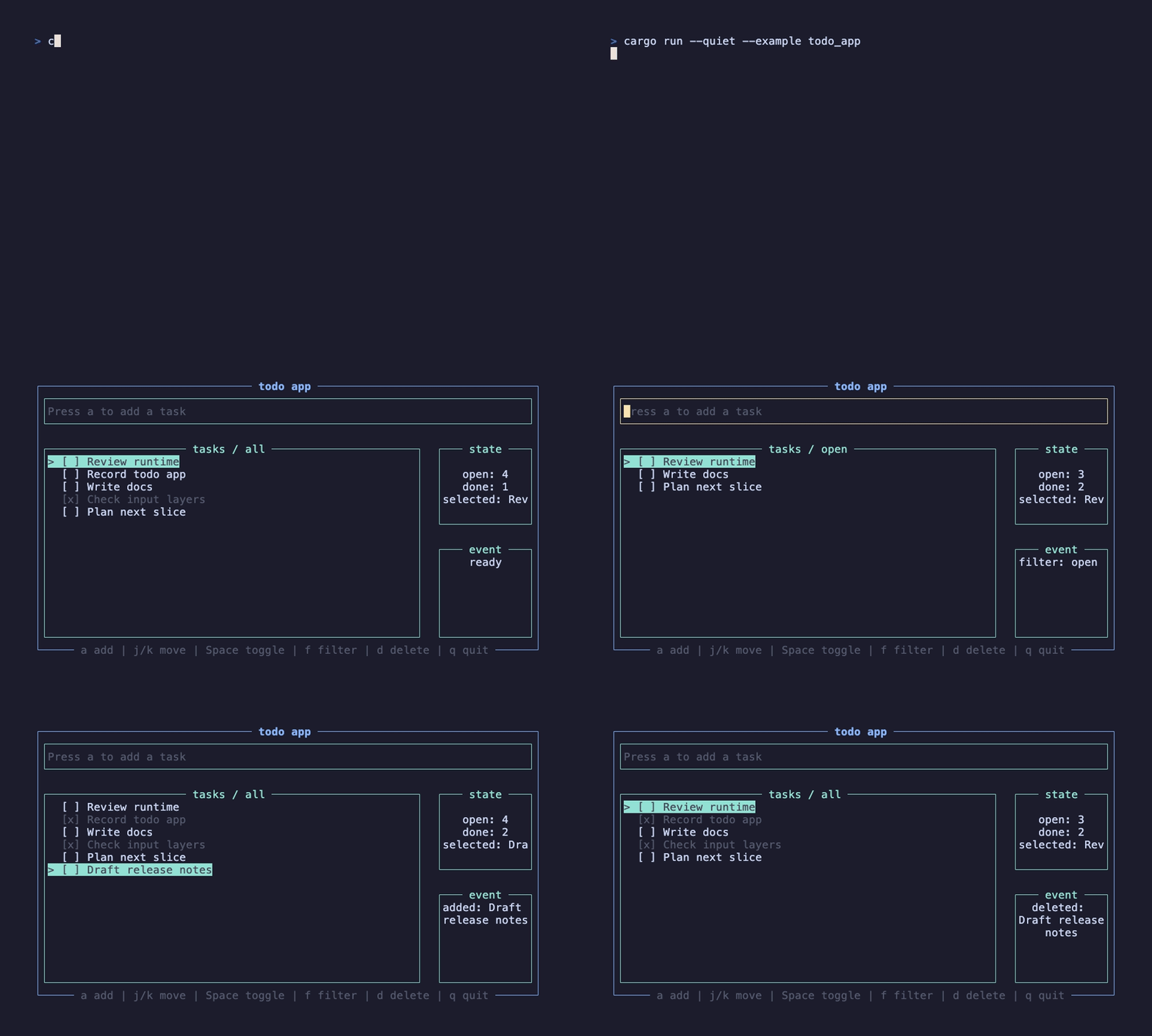
This recording is generated by docs/tapes/todo-app.tape. The example moves between tasks and toggles completion, switches to the open filter, presses a to add Draft release notes, then opens the delete confirmation and presses y to remove the new task.
Run it
Section titled “Run it”Press j/k to move tasks, Space or Enter to toggle completion, f to cycle all/open/done filters, a to add a task, d to delete the current task, and q to exit.
Application structure
Section titled “Application structure”This example intentionally does not split state into a global Atom. The task list, cursor, filter, delete draft, and status only belong to the current application page, so local use_state is enough:
This boundary matches the guidance in Atom global state: put state in the smallest scope that works, and only promote it to Atom when multiple pages or long-lived caches need to share it.
Background shortcuts
Section titled “Background shortcuts”The page-level handler handles only the background workflow:
When no input field or modal is open, this handler belongs to the root layer and can handle j/k/Space/f/d/q normally. Once SearchInput or ConfirmModal opens, their exclusive layers cut off the background layer, so letters typed while adding a task do not also trigger page shortcuts.
Add a task
Section titled “Add a task”Adding a task reuses SearchInput and only changes the activation key to a:
SearchInput is still a controlled input: the displayed value comes from draft, and each input change calls on_change. After a successful submit, it clears the input and closes the edit layer. Returning false keeps edit mode open, which is useful for validation failures.
Delete confirmation
Section titled “Delete confirmation”Deletion uses ConfirmModal:
For ordinary confirmations, you do not need to write use_input_layer yourself. ConfirmModal already creates an exclusive layer internally and passes the same layer to the lower-level Modal. While the modal is open, the background list will not handle j/k/q, and unknown keys are consumed by the modal layer.
Why this example matters
Section titled “Why this example matters”The earlier tutorials separately covered state, input isolation, Router, and components. todo_app puts them into a working interface:
- Business state stays in the page component through
use_state. - Page-level shortcuts return
Consumedto avoid duplicate same-layer handling. - Built-in input components own their layers so keys do not leak through.
- Complex workflows should compose existing components first; only add framework API when component semantics are not enough.
Next, return to the examples roadmap to keep organizing examples by basics / hooks / components / apps.